Image Data Codecs
This appendix describes the ImageN image data compression coders and decoders (codecs).
These are the original JAI Codecs which have been superseded by the Java and ImageIO implementations.
These are provided as a legacy-codec-core dependency for applications wishing to maintain backwards compatibility.
   <dependency>
     <groupId>org.eclipse.imagen</groupId>
     <artifactId>imagen-legacy-codec-core</artifactId>
     <version>0.9.2-SNAPSHOT</version>
   </dependency>
C.1 Introduction
The org.eclipse.imagen.codec package provides a set of interfaces and classes for encoding and decoding compressed image data files. ImageN supports the following codecs:
| Codec | Description |
|---|---|
| BMP | Microsoft Windows bitmap image file format |
| FPX | FlashPix by the Digital Imaging Group (DIG) |
| JPEG | [Joint Photographic Experts Group (JPEG) format |
| PNG | Portable Network Graphics file format |
| PNM | Portable aNy Map file format |
The org.eclipse.imagen.codec package also enables you to create your own additional codecs if those listed above are not sufficient. See Chapter 12, "Extending the API," for more information.
The ImageN codecs are used to both read (decode) and write (encode) compressed images. Decode operations convert compressed image data back into the uncompressed form. Encode operations convert original image data into a compressed data form. These are often called image coding operations, because they use data coding methods to make the conversion to and from the compressed form.
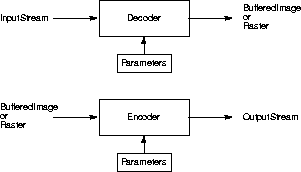
As shown in Figure C-1, the image decode operations transform an InputStream into a BufferedImage or Raster object. The image encode operations transform a BufferedImage or Raster into an OutputStream. Various parameters affect the encode and decode operations. These parameters are usually different for each codec, but include such things as the bit depth, choice of conversion tables, and factors that affect image quality and compression ratio.
If you need to know more about image data compression than is presented here, see “Related Documentation” in the Preface.
C.2 Interfaces and Classes
The following tables list the interfaces and classes used for image data compression and decompression. These interfaces and classes are all part of the org.eclipse.imagen.codec package.
| Interface | Description |
|---|---|
| ImageDecoder | Describes objects that transform an InputStream into a BufferedImage or Raster. |
| ImageEncoder | Describes objects that transform a BufferedImage or Raster into an OutputStream. |
| ImageDecodeParam | Extends: java.lang.Cloneable An empty (marker) interface to be implemented by all image decoder parameter classes. |
| ImageEncodeParam | Extends: ImageDecodeParam, java.lang.Cloneable An empty (marker) interface to be implemented by all image encoder parameter classes. |
| Class | Description |
|---|---|
| ImageCodec | Extends: java.lang.Object Allows the creation of image decoders and encoders. Instances of ImageCodec may be registered by name. Once a codec has been registered, the name associated with it may be used as the name parameter in the createImageEncoder and createImageDecoder methods. |
| ImageDecoderImpl | Extends: java.lang.Object Implements: ImageDecoder An implementation of the ImageDecoder interface useful for subclassing. |
| ImageEncoderImpl | Extends: java.lang.Object Implements: ImageEncoder An implementation of the ImageEncoder interface useful for subclassing. |
| BMPEncodeParam | Extends: java.lang.Object Implements: ImageEncodeParam Specifies parameters for encoding BMP format image files. |
| JPEGEncodeParam | Extends: java.lang.Object Implements: ImageEncodeParam, com.sun.image.codec.jpeg.JPEGEncodeParam Specifies parameters for encoding JPEG format image files. |
| PNMEncodeParam | Extends: java.lang.Object Implements: ImageEncodeParam Specifies parameters for encoding PNM format image files. |
C.3 Encoding a Compressed Image File
The encoding operation is usually performed at the sink end of a rendering graph or chain, after any other operations have been performed and the image is converted into a RenderedImage or a Raster. At this point, the image is ready to be written to a file in one of the supported compressed image data formats.
The encoding of an image file into a supported image format is done with one of the ImageCodec.createImageEncoder methods. To encode a compressed image file, you:
RenderedImage im;
String filename;

FileOutputStream dst = new FileOutputStream(filename)

ImageEncoder enc =
    ImageCodec.createImageEncoder("codec", dst, null);
The “codec” parameter specifies the name of the codec to be used (“BMP”, “JPEG”, “PNG”, or “PNM”). The dst parameter specifies the OutputStream to write to.
enc.encode(im);
dst.close();
The following sample code is an example of encoding a BMP file.
RenderedImage im;
String filename;

FileOutputStream dst = new FileOutputStream(filename)
ImageEncoder enc =
    ImageCodec.createImageEncoder("BMP", dst, null);
enc.encode(im);
dst.close();
API: org.eclipse.imagen.codec.ImageCodec
Returns an ImageEncoder object suitable for encoding to the supplied OutputStream, using the supplied ImageEncodeParam object.
    static ImageEncoder createImageEncoder(java.lang.String name,
                                           java.io.OutputStream dst,
                                           ImageEncodeParam param)
API: org.eclipse.imagen.codec.ImageEncoder
    void encode(java.awt.image.Raster ras)
    void encode(java.awt.image.RenderedImage im)
C.4 Decoding a Compressed Image File
The decoding operation is usually performed at the source end of a rendering graph or chain, before any other operations have been performed.
The decoding of any of the supported image formats is done with one of the ImageCodec.createImageDecoder methods. To decode a compressed image file, you:
The following sample code is an example of decoding a JPEG file.
RenderedImage im;
String filename;

FileInputStream dst = new FileInputStream(filename)
ImageDecoder dec =
    ImageCodec.createImageDecoder("JPEG", dst, null);
enc.decode(im);
dst.close();
API: org.eclipse.imagen.codec.ImageCodec
    static ImageEncoder createImageEncoder(java.lang.String name,
                                           java.io.OutputStream dst,
                                           ImageEncodeParam param)
    static ImageEncoder createImageEncoder(java.lang.String name,
                                           java.io.OutputStream dst)
API: org.eclipse.imagen.codec.ImageEncoder
    void encode(java.awt.image.Raster ras)
    void encode(java.awt.image.RenderedImage im)
C.5 Standard Image Compression Schemes
Several standardized image compression techniques have evolved to support the requirements of different segments of the imaging industry. Java Advanced Imaging supports a small number of these standards. Due to the great variety of standards available, it is not possible for any imaging API to support them all. However, Java Advanced Imaging makes it possible to add any number of image coders and decoders to support special needs. See Chapter 12, "Extending the API," for more information.
C.5.1 BMP Coding
The BMP (Microsoft Windows bitmap image file) file format is a commonly-used file format on IBM PC-compatible computers. BMP files can also refer to the OS/2 bitmap format, which is a strict superset of the Windows format. The OS/2 2.0 format allows for multiple bitmaps in the same file, for the CCITT G3 1bpp encoding, and also a RLE24 encoding.
Java Advanced Imaging currently reads and writes Version2, Version3, and some of the Version 4 images, as defined in the Microsoft Windows BMP file format.
Version 4 of the BMP format allows for the specification of alpha values, gamma values, and CIE color spaces. These are not currently handled, but the relevant properties are emitted, if they are available from the BMP image file.
Versions 3 and later support run-length encoded (RLE) formats for compressing bitmaps that use four or eight bits per pixel.
BMP files are stored in a device-independent bitmap (DIB) format that allows the bitmap to be displayed on any type of display device. The format specifies pixel color in a form independent of the method used by a display to represent color.
The BMP file contains the following:
-
Bitmap-file header - describes the type, size, and layout of the bitmap file.
-
Bitmap-information header - specifies the dimensions, compressed type, and color format for the bitmap.
-
Color table - an array of RGB quad structures that describe a color consisting of relative intensities of red, green, and blue. The array contains as many elements as there are colors in the bitmap. There is no color table for bitmaps with 24 color bits since each pixel is represented by 24-bit red-green-blue (RGB) values in the actual bitmap data area.
-
Bitmap data - an array of bytes that defines the bitmap bits. The bytes represent consecutive rows (or scan lines) of the bitmap. Each scan line consists of consecutive bytes representing the pixels in the scan line, in left-to-right order. The number of bytes representing a scan line depends on the color format and the width, in pixels, of the bitmap.
The bit count information in the bitmap-information header determines the number of bits that define each pixel and the maximum number of colors in the bitmap. The bit count information can have any of the following values:
| Value | Description |
|---|---|
| 1 | Bitmap is monochrome and the color table contains two entries. Each bit in the bitmap array represents a pixel. |
| 4 | Bitmap has a maximum of 16 colors. Each pixel in the bitmap is represented by a four-bit index into the color table. |
| 8 | Bitmap has a maximum of 256 colors. Each pixel in the bitmap is represented by a one-byte index into the color table. |
| 24 | Bitmap has a maximum of 2^24^ colors - each three-byte sequence in the bitmap array represents the relative intensities of red, green, and blue, respectively, for a pixel. |
C.5.1.1 BMP Coding Parameters
Java Advanced Imaging provides four parameters for defining BMP coding: version, compression type, data layout, and the number of bits per pixel.
C.5.1.2 BMP Version
Java Advanced Imaging currently reads and writes Version2, Version3, and some of the Version 4 images. The BMP version number is read and specified with getVersion and setVersion methods in the BMPEncodeParam class. The BMP version parameters are as follows:
| Parameter | Description |
|---|---|
| VERSION_2 | Specifies BMP Version 2 |
| VERSION_3 | Specifies BMP Version 3 |
| VERSION_4 | Specifies BMP Version 4 |
If not specifically set, VERSION_3 is the default version.
API: org.eclipse.imagen.codec.BMPEncodeParam
    int getVersion()
    void setVersion(int versionNumber)
C.5.1.3 BMP Compression Type
The BMP compression type is read and specified with getCompression and setCompression methods in the BMPEncodeParam class. Java Advanced Imaging currently supports four compression types:
| Parameter | Description |
|---|---|
| BI_RGB | Specifies that the bitmap is not compressed. |
| BI_RLE8 | Specifies a run-length encoded format for bitmaps with eight bits per pixel. |
| BI_RLE4 | Specifies a run-length encoded format for bitmaps with four bits per pixel. |
| BI_BITFIELDS | Specifies bitfield compression |
If not specifically set, BI_RGB is the default type (no compression).
API: org.eclipse.imagen.codec.BMPEncodeParam
    int getCompression()
    void setCompression(int compressionType)
C.5.1.4 BMP Data Layout
The scan lines in the BPM bitmap are stored from the bottom up. This means that the first byte in the array represents the pixels in the lower-left corner of the bitmap, and the last byte represents the pixels in the upper-right corner.
The BMP bitmap data layout is read and specified with getDataLayout and setDataLayout methods in the BMPEncodeParam class. The data layout is one of the following:
| Parameter | Description |
|---|---|
| TOP_DOWN | The constant for top-down layout |
| BOTTOM_UP | The constant for bottom-up layout |
API: org.eclipse.imagen.codec.BMPEncodeParam
    int getDataLayout()
    void setDataLayout(int dataLayout)
C.5.1.5 BMP Bits Per Pixel
The number of bits per pixel is specified with getBitsPerPixel and setBitsPerPixel methods in the BMPEncodeParam class. Valid values are 1, 4, 8, and 24. Support for 16- and 32-bit images has also been implemented in Java Advanced imaging, though such BMP images are not very common.
API: org.eclipse.imagen.codec.BMPEncodeParam
    int getBitsPerPixel()
    void setBitsPerPixel(int bitsPerPixel)
C.5.2 FPX (FlashPix) Coding
The FlashPix standard was developed by the Digital Imaging Group (DIG), a not-for-profit consortium of several companies whose purpose is to grow the marketplace for digital imaging solutions through the promotion and ongoing development of open standards. FlashPix is a multi-resolution, tiled file format that allows images to be stored at different resolutions for different purposes, such as editing or printing. Each resolution is divided into 64 x 64 blocks, or tiles. Within a tile, pixels can be either uncompressed, JPEG compressed or single-color compressed.
Flashpix objects are stored in structured storage container files. The image data is stored in defined color spaces. By defining the color space options and providing standard ICC color management profiles, colors remain consistent when viewed across various displays and printers.
FlashPix viewing parameters include area selection, a filtering parameter, a spatial orientation matrix, a colortwist matrix, and a contrast parameter. FlashPix images also includes non-image data definitions, including information such as content description, camera information, and scan description.
The FlashPix file format is designed to work with the Internet Imaging Protocol (IIP). IIP takes a Flashpix object and transports it over a network using a request-response protocol. For example, a command such as "TIL" requests a single tile or ranges of tiles that include coding information. IIP improves the efficiency of transporting Flashpix image files over the Internet by transferring just the data needed. This eliminates the need to create and store multiple files on a server, since one file contains both low and high resolutions - the IIP server delivers the correct resolution needed for the application.
The image information is transferred over the Internet via CGI or server modules. A user then makes a connection through TCP/ IP sockets and IIP does the rest. If a problem should occur, IIP returns an error message.
C.5.3 JPEG Coding
The JPEG standard was developed by a working group, known as the Joint Photographic Experts Group (JPEG). The JPEG image data compression standard handles grayscale and color images of varying resolution and size.
JPEG compression identifies and discards "extra" data that is beyond what the human eye can see. Since it discards data, the JPEG compression algorithm is considered "lossy." This means that once an image has been compressed and then decompressed, it will not be identical to the original image. In most cases, the difference between the original and compressed version of the image is indistinguishable.
An advantage of JPEG compression is the ability to select the quality when compressing the image. The lower the quality, the smaller the image file size, but the more different it will appear than the original.
The JPEG File Interchange Format (JFIF) is a minimal file format that enables JPEG bitstreams to be exchanged between a wide variety of platforms and applications. This minimal format does not include any of the advanced features found in the TIFF JPEG specification or any application-specific file format. The sole purpose of this simplified format is to allow the exchange of JPEG compressed images.
The JFIF features are:
-
Uses the JPEG baseline image compression algorithm
-
Uses JPEG interchange format compressed image representation
-
Compatible with most platforms (PC, Mac, or Unix)
-
Standard color space: one or three components. For three components, YC~b~C~r~ (CCIR 601-256 levels)
-
APP0 marker used to specify Units, x pixel density, y pixel density, and thumbnail. The APP0 marker may also be used to specify JFIF extensions and application-specific information
The APP0 marker is used to identify a JFIF file. The marker provides information that is missing from the JPEG stream, such as version number, x and y pixel density (dots per inch or dots per cm.), pixel aspect ratio (derived from x and y pixel density), and thumbnail.
C.5.3.1 JPEG Encoding Overview
Java Advanced Imaging uses the JPEG baseline DCT coding process, shown in Figure 11-2.
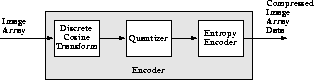
For encoding, the image array is divided into 8 x 8 pixel blocks and a discrete cosine transform (DCT) is taken of each block, resulting in an 8 x 8array of transform coefficients. The DCT is a mathematical operation that takes the block of image samples as its input and converts the information from the spatial domain to the frequency domain. The 8 x 8 matrix input to the DCT represents brightness levels at specific x, y coordinates. The resulting 8 x 8 matrix values represent relative amounts of 64 spatial frequencies that make up the spectrum of the input data.
The next stage in the encoder quantizes the transform coefficients by dividing each DCT coefficient by a value from a quantization table. The quantization operation discards the smaller-valued frequency components, leaving only the larger-valued components.
After an image block has been quantized, it enters the entropy encoder, which creates the actual JPEG bitstream. The entropy encoder assigns a binary Huffman code to coefficient values. The length of each code is chosen to be inversely proportional to the expected probability of occurrence of a coefficient amplitude - frequently-occurring coefficient values get short code words, seldom-occurring coefficient values get long code words. The entropy encoder uses two tables, one for the AC frequency components and one for the DC frequency components.
The JPEG decoding process is essentially the inverse of the encoding process. The compressed image array data stream passes through the entropy encoder, which recreates the quantized coefficient values. Then, the quantized coefficients are reconstructed by multiplication with the quantizer table values. Finally, an inverse DCT is performed and the reconstructed image array is produced.
C.5.3.2 JPEG Coding Parameters
The following are the parameters that may be specified for JPEG DCT compression.
Quantization Table
The setQTable and getQTable methods are used to specify and retrieve the quantization table that will be used in encoding a particular band of the image. There are, by default, two quantizer tables:
| Table | Band |
|---|---|
| 0 | Band 0 |
| 1 | All other bands |
The parameter tableNum is usually a value between 0 and 3. This value indicates which of four quantization tables you are specifying. Table 0 is designed to be used with the luminance band of eight-bit YCC images. Table 1 is designed to be used with the chrominance bands of eight-bit YCC images. Tables 2 and 3 are not normally used.
API: org.eclipse.imagen.codec.JPEGEncodeParam
    void setQTable(int tableNum,
                   com.sun.image.codec.jpeg.JPEGQTable qTable)

    com.sun.image.codec.jpeg.JPEGQTable getQTable(int tableNum)

    void setQTableComponentMapping(int component, int table)

    com.sun.image.codec.jpeg.JPEGQTable getQTableForComponent(int component)

    int getQTableComponentMapping(int component)
AC Huffman Table
Parameters enable you to associate a particular AC Huffman table with a particular band of the image. The JPEG compressor supports four tables for the AC discrete cosine transform coefficients, as listed in Table C-3.
| Table | Band |
|---|---|
| 0 | Encodes AC coefficients in band 0 (luminance band of eight-bit YCC images). This table contains the values specified in Table K.5 of the ISO JPEG specification. |
| 1 | Encodes AC coefficients of all other bands (chrominance band of eight-bit YCC images). This table contains the values specified in Table K.6 of the ISO JPEG specification. |
| 2 | Not used. |
| 3 | Not used. |
API: org.eclipse.imagen.codec.JPEGEncodeParam
    void setACHuffmanTable(int tableNum,
                           com.sun.image.codec.jpeg.JPEGHuffmanTable huffTable)

    com.sun.image.codec.jpeg.JPEGHuffmanTable getACHuffmanTable(int tableNum)

    void setACHuffmanComponentMapping(int component, int table)

    int getACHuffmanComponentMapping(int component)
DC Huffman Table
Parameters enable you to associate a particular DC Huffman table with a particular band of the image. The JPEG compressor supports four tables for the DC discrete cosine transform coefficients, as listed in Table C-4.
| Table | Band |
|---|---|
| 0 | Encodes DC coefficients in band 0 (luminance band of eight-bit YCC images). This table contains the values specified in Table K.3 of the ISO JPEG specification. |
| 1 | Encodes DC coefficients of all other bands (chrominance band of eight-bit YCC images). This table contains the values specified in Table K.4 of the ISO JPEG specification. |
| 2 | Not used. |
| 3 | Not used. |
API: org.eclipse.imagen.codec.JPEGEncodeParam
    void setDCHuffmanTable(int tableNum,
                           com.sun.image.codec.jpeg.JPEGHuffmanTable huffTable)

    void setDCHuffmanComponentMapping(int component, int table)

    com.sun.image.codec.jpeg.JPEGHuffmanTable getDCHuffmanTable(int tableNum)

    com.sun.image.codec.jpeg.JPEGHuffmanTable getDCHuffmanTableForComponent(int component)

    int getDCHuffmanComponentMapping(int component)
Horizontal and Vertical Subsampling
To ensure proper image post-processing and accurate image presentation of JFIF files requires the specification of the spatial positioning of pixel samples within components relative to the samples of other components. This is known as subsampling.
In JFIF files, the position of the pixels in subsampled components are defined with respect to the highest resolution component. Since components must be sampled orthogonally (along rows and columns), the spatial position of the samples in a given subsampled component may be determined by specifying the horizontal and vertical offsets of the first sample, i.e., the sample in the upper left corner, with respect to the highest resolution component.
The horizontal and vertical offsets of the first sample in a subsampled component, Xoffseti[0,0] and Yoffseti[0,0], is defined to be:
    Xoffset*i*[0,0] = (Nsamples*ref* / Nsamples*i*) / 2 - 0.5
    Yoffset*i*[0,0] = (Nlines*ref* / Nlinesi) / 2 - 0.5
- Where
- Nsamplesref is the number of samples per line in the largest component
Nsamplesi is the number of samples per line in the ith component
Nlinesref is the number of lines in the largest component
Nlinesi is the number of lines in the ith component
Proper subsampling of components incorporates an antialiasing filter that reduces the spectral bandwidth of the full resolution components. Subsampling can easily be accomplished using a symmetrical digital filter with an even number of taps (coefficients). A commonly used filter for 2:1 subsampling uses two taps (1/2, 1/2).
API: org.eclipse.imagen.codec.JPEGEncodeParam
    void setHorizontalSubsampling(int component, int subsample)

    void setVerticalSubsampling(int component, int subsample)

    int getHorizontalSubsampling(int component)

    int getVerticalSubsampling(int component)
Marker Data
The JPEG APP0 marker is used to specify units, x pixel density, y pixel density, and thumbnail. The APP0 marker may also be used to specify JFIF extensions and application-specific information. The APP0 marker syntax is defined in Annex B of ISO DIS 10918-1. In addition, a JFIF file uses APP0 marker segments and constrains certain parameters in the frame header as defined below.
         X'FF', SOI
              X'FF', APP0, length, identifier, version, units, XDensity,
         YDensity, Xthumbnail, Ythumbnail, (RGB)n
Table 11-5 describes the marker parameters.
| Parameter | Size | Description |
|---|---|---|
| length | 2 bytes | Total APP0 field byte count, including the byte count value (2 bytes), but excluding the APP0 marker itself |
| identifier | 5 bytes | 4A, 46, 49, 46, 00 A zero terminated string ("JFIF") that uniquely identifies this APP0 marker. |
| version | 2 bytes | ‘0102 The most significant byte is used for major revisions, the least significant byte for minor revisions. Version 1.02 is the current released revision. |
| DensityUnit | 1 byte | Units for the x and y densities: 0 = no units, x and y specify the pixel aspect ratio 1 = x and y are dots per inch 2 = x and y are dots per cm. |
| XDensity | 2 bytes | The horizontal pixel density (bytes per pixel). |
| YDensity | 2 bytes | The vertical pixel density (bytes per pixel). |
| Xthumbnail | 1 byte | The thumbnail horizontal pixel count. |
| Ythumbnail | 1 byte | The thumbnail vertical pixel count. |
| (RGB)n | 3n bytes | Packed (24-bit) RGB values for thumbnail pixels, n = Xthumbnail * Ythumbnail. |
API: org.eclipse.imagen.codec.JPEGEncodeParam
    void setMarkerData(int marker, byte[][] data)

    void addMarkerData(int marker, byte[] data)

    boolean getMarker(int marker)

    byte[][] getMarkerData(int marker)
Density
You can set density parameters, such as the units (inches or centimeters) for the pixel densities and the number of bytes per pixel for both the horizontal and vertical dimensions.
The setDensityUnit method sets the unit of measure for the x and y values. The following values are legal for the setDensityUnit method:
| Value | Meaning |
|---|---|
| 0 | No units. x and y specify the pixel aspect ratio |
| 1 | x and y are dots per inch |
| 2 | x and y are dots per cm. |
The setXDensity and setYDensity methods set the horizontal and vertical pixel density, respectively.
To specify a pixel aspect ratio, use the setDensityUnit method with a value of 0 (no units) and set XDensity and YDensity for the desired aspect ratio. For example, set XDensity = 1 and YDensity = 1 to specify a 1:1 aspect ratio. The values for XDensity and YDensity should always be non-zero.
API: org.eclipse.imagen.codec.JPEGEncodeParam
    void setDensityUnit(int unit)

    void setXDensity(int density)

    void setYDensity(int density)

    int getDensityUnit()

    int getXDensity()

    int getYDensity()
Compression Quality
Compression quality specifies a factor that relates to the desired tradeoff between image quality and the image data compression ratio. The quality value is a float between 1 and 100. A setting of 100 produces the highest quality image at a lower compression ratio. A setting of 1 produces the highest compression ratio, with a sacrifice to image quality. The quality value is typically set to 50.
The compression quality value controls image quality and compression ratio by determining a scale factor the encoder will use in creating scaled versions of the quantization tables. A quality value of 50 defines a scaling factor of 1, which means that the scaled quantization tables are identical to the original tables. A quality value of less than 1 produces a scaling factor greater than 1 and a quality value greater than 1 produces a scaling factor less than 1.
Note: The values stored in the quantization table also affect image quality and compression ratio. See also Quantization Table."
API: org.eclipse.imagen.codec.JPEGEncodeParam
void setQuality(float quality, boolean forceBaseline)
Miscellaneous
These methods don’t currently have a home. I’m not sure what to do with them.
API: org.eclipse.imagen.codec.JPEGEncodeParam
    void setImageInfoValid(boolean flag)

    void setTableInfoValid(boolean flag)

    void setRestartInterval(int restartInterval)

    int getWidth()

    int getHeight()

    boolean isImageInfoValid()

    boolean isTableInfoValid()

    int getEncodedColorID()

    int getNumComponents()

    int getRestartInterval()
C.5.4 PNG Coding
The PNG (Portable Network Graphics) is an extensible file format for the lossless, portable, compressed storage of raster images. PNG was developed as a patent-free alternative to GIF and can also replace many common uses of TIFF. Indexed-color, grayscale, and truecolor images are supported, plus an optional alpha channel. Sample depths range from 1 to 16 bits.
C.5.4.1 PNG Hints
Table 11-6 lists the PNG hints.
| Hint Key | Class | Default Value |
|---|---|---|
| KEY_PNG_EMIT_ALPHA | Boolean | Boolean.FALSE |
| KEY_PNG_EMIT_16BITS | Boolean | Boolean.FALSE |
| KEY_PNG_EMIT_SQUARE_PIXELS | Boolean | Boolean.FALSE |
PNG images stored with a bit depth of 16 are truncated to eight bits of output unless the KEY_PNG_EMIT_16BITS hint is set to Boolean.TRUE. Similarly, the output image will not have an alpha channel unless the KEY_PNG_EMIT_ALPHA hint is set.
Normally no correction is made for images with non-square pixels. To automatically perform a simple scale to correct for such distortion, use the KEY_PNG_EMIT_SQUARE_PIXELS hint. The correct aspect ratio may be retrieved by means of the pixel_aspect_ratio property.
Will there be a PNGEncodeParam class?
C.5.5 PNM Coding
The PNM format is one of the extensions of the PBM file format (PBM, PGM, and PPM). The portable bitmap format is a lowest-common-denominator monochrome file format. It was originally designed to make it reasonable to mail bitmaps between different types of machines. It now serves as the common language of a large family of bitmap conversion filters.
The PNM fotmat comes in six variants:
-
PBM ASCII - three-banded images
-
PBM raw - three-banded images
-
PGM ASCII - single-banded images
-
PGM raw - single-banded images
-
PPM ASCII - single-banded images
-
PPM raw - single-banded images
API: org.eclipse.imagen.codec.PNMEncodeParam
    void setRaw(boolean raw)
    boolean getRaw()
C.5.6 TIFF Coding
Note: TIFF image compression and decompression is not yet implemented.
A TIFF image file consists of several entries, each of which has a tag and some associated data. The tag indicates the purpose of the associated data. The tags and data define the image's format, size, and other parameters, including the image data itself.
As shown in Figure C-3, a TIFF image file is divided into a header, one or more Image File Directories (IFD), IFD entries, and data.
The file header consists of eight bytes of data, containing the following information:
-
Byte-order indicator - two bytes that specify whether the image data is ordered by least-significant byte first as used in Intel processors), or most-significant byte first (as used in Sun SPARC and Motorola processors). The indicator is
IIfor Intel platforms,MMfor Sun SPARC and Motorola processors. The byte-order indicator is what makes the image file portable between platforms. -
Version number - two bytes that indicate the TIFF version number (not to be confused with the revision number, which changes with each release of the TIFF standard).
-
IFD address - four bytes that specify the address of the first IFD relative to the beginning of the file. A TIFF image file generally includes a single IFD, but may contain more.
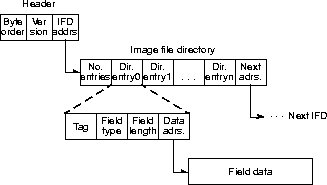
The Image file directory contains the following:
-
Number of entries - two bytes that indicate the number of entries in the IFD.
-
Directory entries - one or more IFD entries, which consist of the following:
-
Tag number - a tag that indicates the meaning of the following data. The Java Advanced Imaging TIFF reader reads all the tags listed in Table C-7.
-
Field type - defines the type of data. Java Advanced Imaging supports all 12 of the TIFF 6.0 standard data types listed in Table C-8.
-
Field length - four bytes that indicate the number of data items in the field data.
-
Data address - four bytes that contain the address of the entry field data, relative to the start of the file.
C.5.6.1 Image Tags
The tags listed in Table C-7 define the parameters and data of the image stored in the TIFF file. The TIFF_ImageWidth, TIFF_ImageLength, and TIFF_BitsPerSample tags define the number of pixels in the image, the number of lines, and the pixel depth, respectively. The TIFF_Compression tag defines the data compression algorithm used to store the image, such as run-length coding, Lempel-Ziv-Welch (LZW), or JPEG.
Table C-7* Standard TIFF Image Tags
| Tag Name | Tag Number |
|---|---|
| TIFF_NewSubfileType | 254 |
| TIFF_SubfileType | 255 |
| TIFF_ImageWidth | 256 |
| TIFF_ImageLength | 257 |
| TIFF_BitsPerSample | 258 |
| TIFF_Compression | 259 |
| TIFF_PhotometricInterpretation | 262 |
| TIFF_Thresholding | 263 |
| TIFF_CellWidth | 264 |
| TIFF_CellLength | 265 |
| TIFF_FillOrder | 266 |
| TIFF_DocumentName | 269 |
| TIFF_ImageDescription | 270 |
| TIFF_Make | 271 |
| TIFF_Model | 272 |
| TIFF_StripOffsets | 273 |
| TIFF_Orientation | 274 |
| TIFF_SamplesPerPixel | 277 |
| TIFF_RowsPerStrip | 278 |
| TIFF_StripByteCounts | 279 |
| TIFF_MinSampleValue | 280 |
| TIFF_MaxSampleValue | 281 |
| TIFF_XResolution | 282 |
| TIFF_YResolution | 283 |
| TIFF_PlanarConfiguration | 284 |
| TIFF_PageName | 285 |
| IFF_XPosition | 286 |
| TIFF_YPosition | 287 |
| TIFF_FreeOffsets | 288 |
| TIFF_FreeByteCounts | 289 |
| TIFF_GrayResponseUnit | 290 |
| TIFF_GrayResponseCurve | 291 |
| TIFF_T4Options | 291 |
| TIFF_T6Options | 293 |
| TIFF_ResolutionUnit | 296 |
| TIFF_PageNumber | 297 |
| TIFF_Software | 301 |
| TIFF_Software | 305 |
| TIFF_DateTime | 306 |
| TIFF_Artist | 315 |
| TIFF_HostComputer | 316 |
| TIFF_Predictor | 317 |
| TIFF_WhitePoint | 318 |
| TIFF_PrimaryChromaticities | 319 |
| TIFF_ColorMap | 320 |
| TIFF_HalftoneHints | 321 |
| TIFF_TileWidth | 322 |
| TIFF_TileLength | 323 |
| TIFF_TileOffsets | 324 |
| TIFF_TileByteCounts | 325 |
| TIFF_InkSet | 332 |
| TIFF_InkNames | 333 |
| TIFF_NumberOfInks | 334 |
| TIFF_DotRange | 336 |
| TIFF_TargetPrinter | 337 |
| TIFF_ExtraSamples | 338 |
| TIFF_SampleFormat | 339 |
| TIFF_SMinSampleValue | 340 |
| TIFF_SMaxSampleValue | 341 |
| TIFF_TransferRange | 342 |
| TIFF_JPEGProc | 512 |
| TIFF_JPEGInterchangeFormat | 513 |
| TIFF_JPEGInterchangeFormatLngth | 514 |
| TIFF_JPEGRestartInterval | 515 |
| TIFF_JPEGLosslessPredictors | 517 |
| TIFF_JPEGPointTransforms | 518 |
| TIFF_QTables | 519 |
| TIFF_DCTables | 520 |
| TIFF_ACTables | 521 |
| TIFF_ACTables | 529 |
| TIFF_YCbCrSubSampling | 530 |
| TIFF_YCbCrPositioning | 531 |
| TIFF_ReferenceBlackWhite | 532 |
| TIFF_Copyright | 33432 |
| TIFF_ModelPixelScaleTag | 33550 |
| TIFF_ModelTransformationTag | 33920 |
| TIFF_ModelTiepointTag | 33922 |
| TIFF_GeoKeyDirectoryTag | 34735 |
| TIFF_GeoDoubleParamsTag | 34736 |
| TIFF_GeoAsciiParamsTag | 34737 |
The TIFF_PhotometricInterpretation tag defines the image type. For example, for a bilevel or grayscale image, whether the image is quantized with black = 0 or with white = 0. For color images, this tag identifies the image as RGB full color, palette color, or transparency mask.
TIFF extensions, such as GeoTIFF (see the GeoTIFF Web Page at http://home.earthlink.net/~ritter/geotiff/geotiff.html), operate by defining additional private tags, usually referenced by a small number of globally-registered TIFF tags. Java Advanced Imaging allows such tags to be decoded into first-class tags by adding suitable PropertyGenerator objects.
C.5.6.2 Data Types
Java Advanced Imaging supports all of the TIFF 6.0 standard data types listed in Table C-8.
| TIFF Data Type | Java Data Type | Description |
|---|---|---|
| TIFF_ASCII | byte | Null-terminated ASCII strings |
| TIFF_BYTE | byte | 8-bit unsigned integers |
| TIFF_SBYTE | byte | 8-bit signed integers |
| TIFF_SHORT | char | 16-bit unsigned integers |
| TIFF_SSHORT | short | 16-bit signed integers |
| TIFF_LONG | long | 32-bit unsigned integer |
| TIFF_SLONG | int | 32-bit signed integers |
| TIFF_FLOAT | float | Pairs of 32-bit IEEE floating-point values |
| TIFF_DOUBLE | double | Pairs of 32-bit IEEE double floating-point values |
| TIFF_RATIONAL | long[2] | Pairs of 32-bit unsigned integers |
| TIFF_SRATIONAL | int[2] | Pairs of 32-bit signed integers |
| TIFF_UNDEFINED | byte | 8-bit uninterpreted bytes |
C.6 Transform Coding
Transform coding is a form of lossy block coding that transforms blocks of the image from the spatial domain to the frequency domain. The fundamental frequency component values of the frequency domain image are the codes that are stored as the compressed image.
Java Advanced Imaging supports a form of transform coding known as the discrete cosine transform (DCT). The DCT is one of several frequency transforms that may be used in transform image compression. One of the things that makes DCT unique is that it works well for a wide range of arbitrary image types. It produces the fewest number of frequency components and, thus, the smallest compressed image file size.
The DCT is similar to the discrete Fourier transform (see Section 6.6.1, "Discrete Fourier Transform"). However, the DCT is better at compactly representing very small images. The drawback is that the DCT requires more computational power than the discrete Fourier transform.
The DCT operation breaks the source image into pixel blocks of 8 x 8 pixels. The discrete cosine transform then is performed on each block, transforming each block into frequency-domain representation. Minimally-valued frequency components are discarded, leaving only those components that contribute significantly to the image. The DCT image compression causes some image degradation that increases proportionally with increased compression ratios. Typically, DCT provides a compression ratio of 10:1 without serious image quality degradation.
Like the discrete Fourier transform (DFT), the DCT also has an inverse operation, the inverse discrete cosine transform (IDCT).
C.6.1 Discrete Cosine Transform (DCT)
The DCT operation computes the even discrete cosine transform of an image. Each band of the destination image is derived by performing a two-dimensional DCT on the corresponding band of the source image.
The DCT operation does not take any parameters.
API: org.eclipse.imagen.ImageN
    static RenderedOp create("dct",
                             RenderedImage im)

    static RenderableOp createRenderable("dct",
                                          ParameterBlock paramBlock,
                                          RenderingHints hints)
C.6.2 Inverse Discrete Cosine Transform (IDCT)
The IDCT operation computes the inverse even discrete cosine transform of an image. Each band of the destination image is derived by performing a two-dimensional inverse DCT on the corresponding band of the source image.
The IDCT operation does not take any parameters.
API: org.eclipse.imagen.ImageN
    static RenderedOp create("idct",
                             RenderedImage im)

    static RenderableOp createRenderable("idct",
                                         ParameterBlock paramBlock,
                                         RenderingHints hints)